Medical and technical equipment
Electronics, Displays, and Technical Product Freight
Electronics and display freight needs more than a pickup and delivery address. Screens, kiosks, mounts, carts, cases, and technical components need packaging notes, condition visibility, appointment timing, and a receiving plan.
Article guide
What this article helps plan
A technical product shipper needs to move electronics or display systems with attention to condition, packaging, access, and receiving handoff.
- Who needs to be aligned before pickup or delivery.
- Which product details affect the freight path.
- Where timing, access, condition, and final placement can create risk.
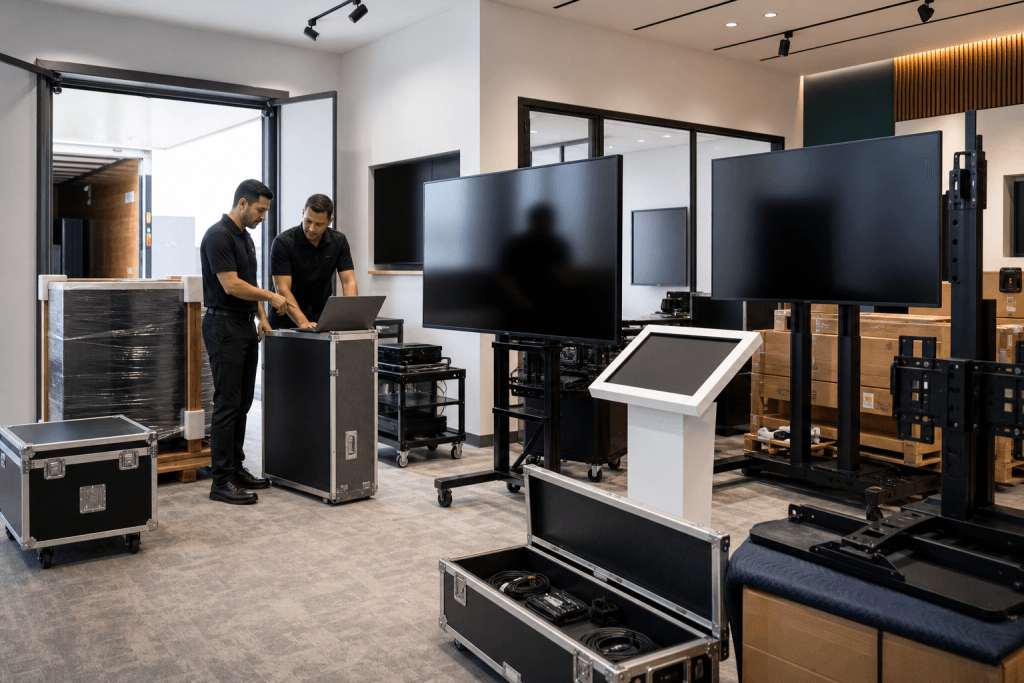
Electronics, display systems, and technical products can look like ordinary freight on paper, but the real handling requirements are different. A shipment may include large screens, touch displays, kiosks, AV carts, mounts, control equipment, accessory cases, crated components, or finished technical products that need to arrive in usable condition.
Why this product needs planning
For electronics brands, display manufacturers, AV suppliers, technical product companies, showroom teams, and facilities teams, the shipment is often tied to a room setup, customer installation, office rollout, retail display, product demonstration, or facility opening. The freight plan should account for the product and the receiving environment, not just the lane.
Details to confirm before pickup
- Product dimensions, weight, finish sensitivity, and packaging condition.
- Pickup and delivery addresses, access notes, receiving contacts, and appointment windows.
- Whether the delivery requires inside placement, stairs, elevators, dock access, or room-ready handling.
Destination and receiving details
The first requirement is identifying what is moving. A wall-mounted display, freestanding kiosk, interactive screen, accessory case, boxed component, or mounted AV cart can each create different handling expectations. Product details should include dimensions, weight, screen size, packaging status, mount or stand details, loose accessories, cable cases, and whether the equipment must remain upright.
How HHX helps coordinate the move
Screens and technical surfaces need condition visibility. A product can be intact but still arrive with a cracked display, damaged frame, missing accessory, loose mount, scratched surface, or unclear carton condition. Photos, packaging notes, and visible condition checks help make the handoff easier to manage.
Packaging matters because electronics can be sensitive to pressure, tipping, impact, moisture, and rough stacking. Some items ship in manufacturer cartons. Others move in reusable cases, crates, foam inserts, pallets, or blanket-wrapped assemblies. The logistics conversation should make clear which items can be stacked, which should remain upright, which need extra clearance, and which components travel separately.
The receiving site can be just as important as the product. Electronics and display systems may go to offices, schools, showrooms, hospitals, retail spaces, conference rooms, event sites, control rooms, studios, or facility rooms. Each location can have different access rules, dock limits, elevator dimensions, security requirements, delivery windows, or receiving contacts.
Appointment timing helps reduce risk. Technical equipment may need to meet an installer, facilities manager, IT contact, AV team, or project lead. If the shipment arrives without the right receiver, the product may be left in the wrong place or delayed before installation.
Piece count and accessory control should be part of the plan. Displays, stands, mounts, cables, control boxes, remotes, cases, manuals, and hardware can get separated if they are not labeled or grouped clearly. A practical freight plan should help the receiver understand what is arriving and how the pieces connect to the setup.
HHX should not describe every electronics shipment as white-glove delivery. Some technical products may move through an LTL or FTL freight path with better documentation and appointment coordination. Others may need high-care handling because of screen size, value, installation timing, access limitations, or customer-facing presentation.
For business shippers, the useful details are straightforward: product list, photos, packaging status, dimensions, weights, accessory count, receiving contact, destination access, timing requirements, and any special handling notes. Those details help HHX discuss a freight path that fits the equipment.
Before requesting support, shippers should gather item photos, packaging photos, screen or product sizes, carton count, case count, weights, dimensions, pickup readiness, delivery address, receiving contact, access notes, appointment window, and any upright or no-stack requirements. That information gives the move a clearer starting point.
Next step for shippers
Send the shipment details before the freight path is assumed.
HHX can review product dimensions, access notes, timing, packaging, and delivery requirements before the shipment is routed.
Contact HHX